Launchfy.support is a service that lets you create a site like this —
with the “help” part replaced by your own app name — in just three minutes.
What is the “support site” required for release?
When releasing an app, you need a support site where users can submit inquiries. If you are registering on the App Store, you must provide the URL at submission. You must provide a web URL so even users who cannot use the app can contact you.
Nowadays, many use form-building services like Google Forms or Peraichi. There are quite a few that can be used for free.
However, while form services can accept inquiries, they often don’t consider reply workflows and may not be ideal for app development. On the other hand, customer support services offer full ticket management but are often overkill for individual developers.
In this situation, Launchfy includes all functions needed for app support and is already built. You can create the support site URL required for store review in 5 minutes.
Comparison of tools/services commonly used for app support
| Comparison | Launchfy.Support | Form Builders Google Forms / Peraichi / Tally, etc. | Publishing an Email Address Directly | Customer Support Zendesk, etc. |
|---|---|---|---|---|
| Setup effort | Zero (auto-generated) No field settings required. Ready from the start. | Medium Parts placement, field settings, and design adjustments required. | Low Just add a link. | High Initial setup and flow design required. |
| Replying to users | ◎ Reply instantly from admin Smooth chat-style replies. | ▲ Cannot / Optional May require external integrations. | ○ Regular email Reply via mail client. | ◎ Full support features Automation and team workflows available. |
| Sending environment info | ◎ Auto-attached via parameters. (Pro) | × Not possible | × Not possible | △ Possible with API setup |
| Conversation history | ◎ Ticket management Readable thread format. | × No history Or managed individually in spreadsheets. | × Email-dependent Easy to get lost. | ◎ Ticket management |
| Privacy | ◎ Fully private Developer address not exposed. | △ Depends on settings Replying may require exposing email. | × Fully public Spam risk. | ◎ Safe if configured properly |
| Store submission | ◎ Just copy-paste the URL Ideal for review. | ○ OK if prepared Works if using custom domain and polished appearance. | × Not recommended | ○ Can be handled via URL |
| Cost | ◎ Free to start | ○ Free to paid | ◎ Free | × Expensive (paid plans required) |
Launchfy Inquiry Features
Provided features
- Web inquiry form
- Ticket management dashboard
Customizable parts
- Web form The introductory text of the web inquiry form can be edited using Markdown like other pages.
- Embedding environment info When users inquire from the app, you may want to include app version info. By embedding data in the form URL as key=parameter, the data will be submitted along with the inquiry when the form is sent. (Pro plan only)
Support form operation flow
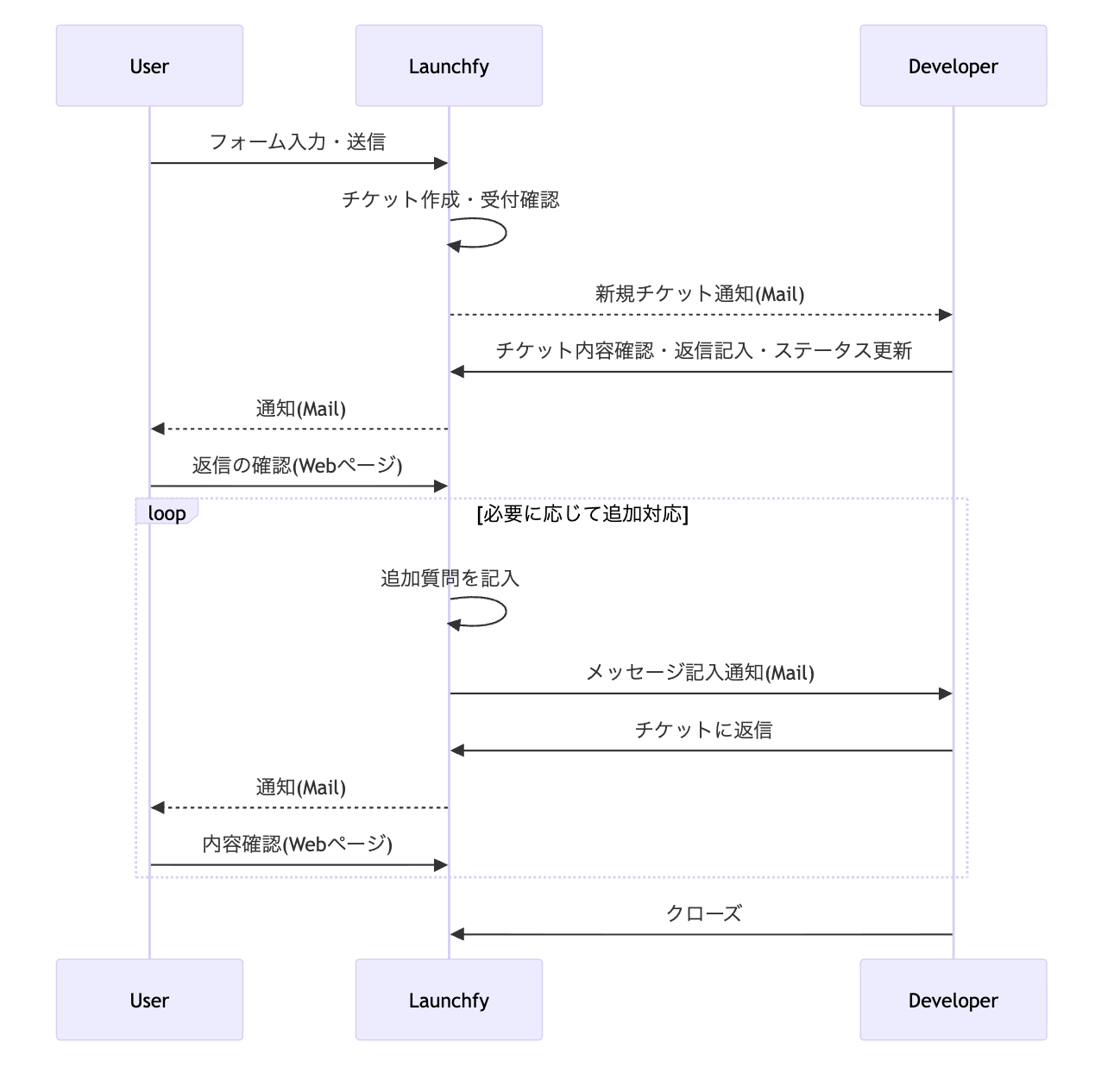
This document shows the flow from a user submitting an inquiry via the support form to the developer receiving, responding, and resolving it. Use it to understand the overall process and standardize operations.
Flow overview
- The user fills in required fields on the web inquiry form and submits.
- The system receives the inquiry, generates a management ticket, and notifies the developer (email).
- The developer (or support staff) reviews the content and writes a reply to the user.
- The user receives a notification (email: domain is launchfy.support). This email contains a link to the reply confirmation page.
- Tapping the link displays the reply confirmation page.
- If further exchanges are needed, they occur with email notifications for each message and the content viewable on the web reply confirmation page.
Security measures
Because the form page is publicly accessible and a common bot target, we implement the following measures:
- Bot detection and rate limiting.
- File attachments are disabled on the initial form submission. (Attachments are allowed after we reply.)
- We do not send an email confirmation when an inquiry is received.